An Azure Kubernetes Service cluster reporting that a newer Kubernetes version is available does not mean the production environment is ready to upgrade. The important question is not simply how to upgrade AKS, but what evidence is needed before the change can be safely approved.
The production upgrade problem
At first glance, an AKS upgrade appears straightforward: identify a supported version, execute the upgrade, allow nodes and workloads to cycle, and verify that the pods return to a healthy state.
In production, that is not enough.
An AKS upgrade can affect the control plane, node pools, workload scheduling, persistent storage, databases, caches, network dependencies, application availability and ultimately the users of the system.
Design principle
An available Kubernetes upgrade tells us that a platform change is possible. It does not tell us that the application environment is ready for that change.
The upgrade should therefore be treated as a production change involving the whole system rather than simply a Kubernetes version change.
Production readiness path

The upgrade command should come near the end of this process, not the beginning.
---
1. Establish evidence before making changes
One of the most useful disciplines in a production assessment is separating what is known from what is assumed.
A simple evidence model can use four classifications:
| Classification | Meaning |
|---|---|
| VERIFIED | Confirmed from available evidence |
| REQUIRES CHECK | Cannot yet be verified or requires another owner |
| RISK | Evidence indicates potential production impact |
| ACTION | Something must be addressed as part of upgrade readiness |
This prevents unknown information from quietly becoming assumed information.
For example, a read-only Kubernetes account may allow an engineer to inspect deployments, pods, node pools and disruption budgets while preventing command execution inside a database container.
The correct conclusion is not that the database is probably compatible.
It is:
Database version and compatibility — REQUIRES CHECK.
The same principle applies to backups, recovery procedures, storage configuration and infrastructure owned by another team.
A production change should be approved from evidence rather than assumptions.
---
2. Build the cluster baseline
Before considering the target version, understand the environment that exists today.
At minimum, inventory:
- Current Kubernetes version
- Supported upgrade path
- Support and upgrade configuration
- System and user node pools
- Namespaces
- Deployments and StatefulSets
- Services
- Persistent storage
- PodDisruptionBudgets
- Recent cluster events
Typical Kubernetes inspection commands include:
kubectl get nodes -o wide
kubectl get namespaces
kubectl get deployments -A
kubectl get statefulsets -A
kubectl get pods -A -o wide
kubectl get pdb -A
kubectl get pvc -A
kubectl get events -A
Azure CLI provides complementary information about the AKS cluster and its node pools.
The objective is not to collect commands. It is to answer three questions:
What is running?
Where is it running?
What happens if that location becomes temporarily unavailable?
Those questions expose a significant amount of upgrade risk.
---
3. Understand node-pool topology
AKS workloads do not exist independently of their nodes.
A cluster may contain a system pool for critical platform components and one or more user pools for application workloads.
Typical topology
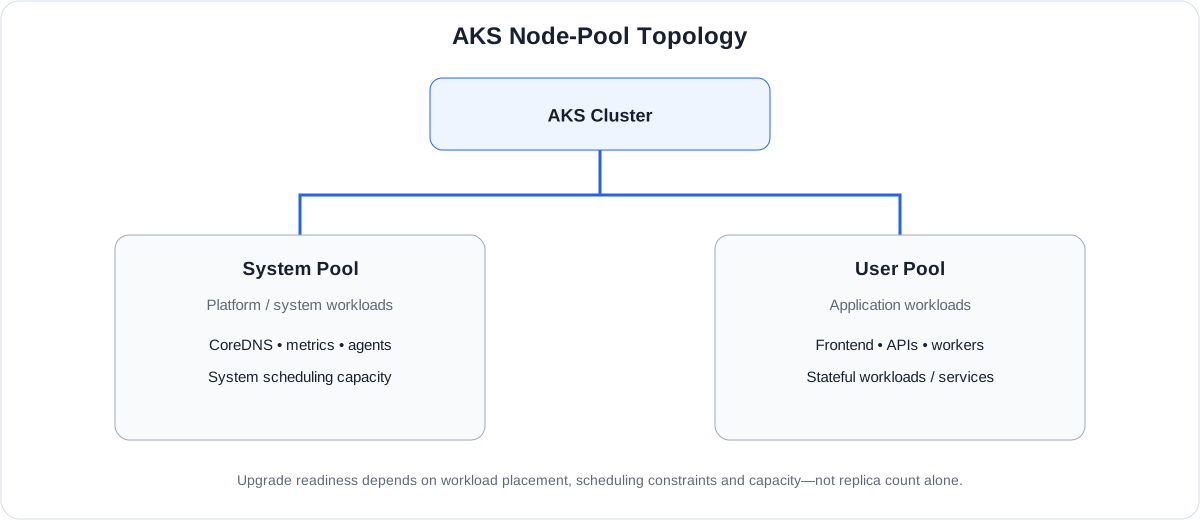
For every pool, understand:
- Its purpose
- Node count
- VM size
- Kubernetes version
- Operating-system and container-runtime state
- Autoscaling configuration
- Labels and taints
- Node selectors and other scheduling constraints
- Available scheduling capacity
Availability principle
Pod replica count and node-level resilience are not the same thing. Multiple replicas provide limited protection if the underlying scheduling topology cannot keep those replicas available during disruption.
An upgrade plan therefore needs a workload-to-node-pool understanding, not merely a list of deployments.
---
4. Map workloads and dependencies
The next step is to stop looking at AKS only as a cluster and start looking at it as an application platform.
For every important workload, determine:
- Replica count
- Deployment strategy
- Readiness and liveness behaviour
- PodDisruptionBudget
- Node selector or affinity
- Persistent storage
- External dependencies
- Expected recovery behaviour
Different workload types carry different risks:
| Workload type | Typical upgrade concern |
|---|---|
| Frontend | Temporary availability |
| Stateless API | Reduced capacity or restart |
| WebSocket service | Interrupted connections |
| Background worker | Interrupted or duplicated processing |
| Cache | Session or state loss |
| Database | Persistence and data integrity |
The fact that all pods are currently running provides little evidence about upgrade readiness.
The important question is what happens when those pods stop running where they are now.
---
5. Understand the single-replica trap
A workload configured with one replica can look completely healthy during normal operation.
During a node drain, however, the sequence becomes:
Single-replica disruption path

Even when every step works correctly, there can be a period when no ready instance is serving traffic.
A rolling deployment strategy does not automatically eliminate this risk.
Actual availability depends on several conditions working together:
Replica count + scheduling capacity + disruption policy + readiness + application startup behaviour
Single-replica workloads should therefore be explicitly identified during upgrade planning.
That does not automatically mean every deployment must permanently run multiple replicas. It means the potential disruption must be understood and intentionally accepted or mitigated.
---
6. Treat stateful workloads differently
A stateless application can often recover by starting a replacement pod and returning it to service after readiness succeeds.
Stateful workloads introduce additional dependencies.
Stateful recovery path
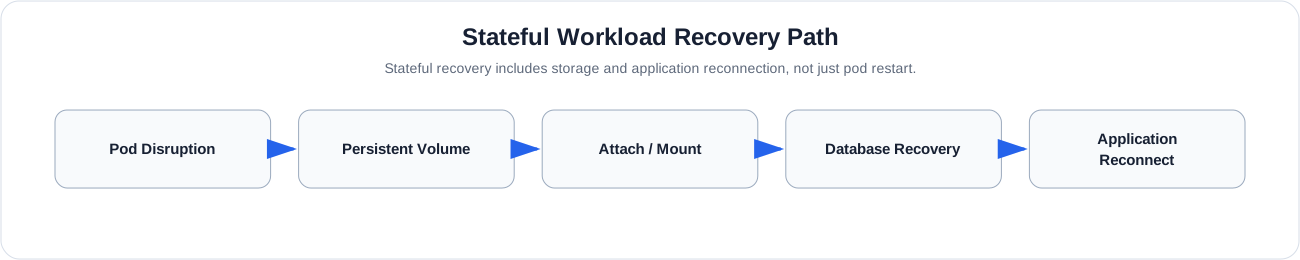
Before approving an upgrade involving stateful workloads, verify:
- How data is persisted
- StorageClass configuration
- PVC and PV health
- Backup freshness and location
- Restore procedure
- Database topology
- Node scheduling constraints
- Graceful termination behaviour
- Application reconnection behaviour
- Recovery ownership
Recovery principle
Having a backup and having a proven recovery capability are not the same thing. A backup that has never been restored provides less assurance than a documented and tested recovery procedure.
For production stateful workloads, recovery evidence should be part of the upgrade decision.
---
7. Respect verification boundaries
Production environments are frequently assessed using restricted access. That is healthy security practice, but it means an assessor may not be able to verify every dependency independently.
An assessment can explicitly record that boundary:
| Check | Evidence status |
|---|---|
| Deployment inventory | VERIFIED |
| Node-pool topology | VERIFIED |
| Replica counts | VERIFIED |
| PDB configuration | VERIFIED |
| Database version | REQUIRES CHECK |
| Backup freshness | REQUIRES CHECK |
| Restore validation | REQUIRES CHECK |
Restricted access should not encourage assumptions or attempts to bypass controls.
It should create an evidence hand-off to the infrastructure, database, security or platform team responsible for the missing verification.
Access limitations are not necessarily blockers. Unresolved critical evidence is.
---
8. Check compatibility beyond Kubernetes
An AKS environment contains more than a Kubernetes version.
Compatibility should be considered across:
- Node operating system
- Container runtime
- Networking
- DNS
- Storage and CSI components
- Ingress
- Monitoring
- Kubernetes APIs
- Application dependencies
One particularly important check is the use of deprecated or removed Kubernetes APIs.
A workload that operates correctly on the current version may depend on behaviour that changes in the target environment.
Compatibility therefore needs to be assessed against the target environment, not inferred from the health of the current one.
---
9. Convert findings into a risk register
An assessment becomes much more useful when observations are converted into explicit risks.
Use the relationship:
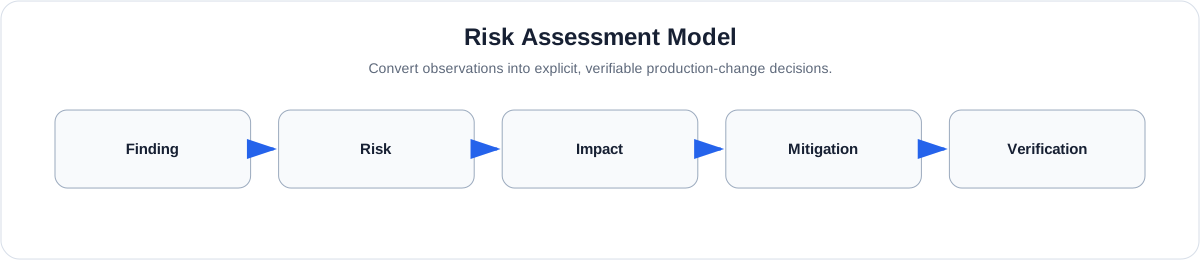
For example:
| Finding | Risk | Possible mitigation |
|---|---|---|
| Single application replica | Temporary outage | Controlled window or additional capacity |
| Stateful database on affected pool | Service or data disruption | Verify persistence and recovery |
| Missing application PDB | Uncontrolled disruption | Assess appropriate disruption policy |
| Node selector | Scheduling constraint | Verify destination capacity |
| Unknown database compatibility | Upgrade uncertainty | Obtain database/platform verification |
Not every risk requires changing the architecture before an upgrade.
Some risks can be managed through maintenance windows, temporary scaling, sequencing, monitoring, recovery procedures or explicit business acceptance.
The important requirement is that the risk is known before the change begins.
---
10. Define the decision gate
Once the evidence and risks have been assembled, the team needs an explicit readiness decision.
GO
Critical compatibility, availability and recovery checks have been verified, and identified risks have acceptable controls.
CONDITIONAL GO
The upgrade may proceed only after specific prerequisites are completed.
For example:
- Database compatibility confirmed
- Backup verified
- Temporary replica increase completed
- Maintenance window approved
NO-GO
A critical unresolved issue creates unacceptable risk to data integrity, recoverability, application availability, platform compatibility or business continuity.
This provides engineering and infrastructure teams with a shared definition of readiness rather than relying on an informal conclusion that everything looks acceptable.
---
11. Plan the upgrade sequence
Only after readiness has been established should execution planning become the focus.
High-level execution sequence

The exact supported AKS upgrade path and sequencing should always be verified against the platform state and the Microsoft guidance applicable at the time of the change.
The important architectural principle is not to treat the upgrade as one indivisible operation.
Create validation points between meaningful stages so unexpected behaviour can be detected before proceeding further into the change.
---
12. Validate the system, not just Kubernetes
After an upgrade, a command such as:
kubectl get pods -Ais useful, but it is not sufficient.
Validation should operate at several levels.
Infrastructure
- Are nodes Ready?
- Are the expected versions running?
- Are node pools healthy?
- Is scheduling operating normally?
Kubernetes
- Are pods healthy?
- Are there unexpected restarts?
- Are new warning events appearing?
- Are disruption budgets healthy?
- Are persistent volumes healthy?
Application
- Is the frontend accessible?
- Is authentication functioning?
- Are core APIs responding?
- Are long-running connections healthy?
- Is background processing functioning?
Data
- Are databases reachable?
- Are reads and writes working?
- Is cache behaviour healthy?
- Is persistence intact?
Observability
- Have new errors appeared?
- Has the 5xx rate increased?
- Has latency changed?
- Is there unexpected CPU or memory pressure?
- Have restart counts increased?
Finally, execute business smoke tests for the system's most important user journeys.
Validation principle
There is a major difference between "the Kubernetes upgrade completed" and "the production system was validated successfully after the Kubernetes upgrade." The second outcome is what matters.
---
13. Prepare for recovery, not just rollback
"Rollback plan" is commonly included in change-management processes, but for platform upgrades the phrase can be misleading if it implies that every component can simply be downgraded.
Instead, establish:
- What can actually be rolled back
- What cannot
- How workloads will recover
- How data will be restored
- Who owns each recovery action
- When the change should stop
- When escalation begins
- What downtime is acceptable
Recovery planning should exist before the change starts.
A production team should know how it intends to respond to failure rather than designing that response after the failure occurs.
---
14. AKS production upgrade readiness checklist
The following checklist can be used before approving the production change.
Cluster
- Current Kubernetes version identified
- Supported target and upgrade path confirmed
- Node pools inventoried
- Node capacity understood
Workloads
- Deployments and StatefulSets inventoried
- Workloads mapped to node pools
- Replica counts reviewed
- Scheduling constraints reviewed
- PodDisruptionBudgets reviewed
- Readiness and liveness behaviour understood
State
- Stateful workloads identified
- PVC/PV configuration verified
- Database compatibility verified
- Backup freshness verified
- Recovery and restore procedure verified
Compatibility
- Deprecated Kubernetes APIs assessed
- Platform dependencies reviewed
- Storage and networking dependencies reviewed
- Application compatibility reviewed
Change
- Risks documented
- Required mitigations completed
- Go / Conditional Go / No-Go decision recorded
- Maintenance window agreed
- Upgrade sequence defined
- Validation checkpoints defined
Recovery
- Failure criteria defined
- Recovery ownership established
- Data recovery path understood
- Escalation path established
Post-upgrade
- Nodes validated
- Workloads validated
- Persistent storage validated
- Core APIs tested
- Business journeys tested
- Errors, latency and resources monitored
Why the checklist is intentionally broad
Production readiness is broader than Kubernetes configuration. The application, its data, dependencies, recovery capability and operational ownership are all part of the upgrade decision.
---
15. Lessons beyond AKS
Although this approach is framed around Azure Kubernetes Service, the underlying engineering principle applies to many production changes:
- Database upgrades
- Runtime migrations
- Network changes
- Cloud-region migrations
- Major framework upgrades
The pattern remains consistent:
Production change lifecycle

Senior engineering decisions are often less about knowing the command that performs a change and more about understanding what the change can affect.
That is ultimately what production readiness means.
---
Closing
An AKS upgrade should not begin with an upgrade command.
It should begin with an inventory and a set of questions.
When a team understands its node topology, workload placement, availability assumptions, stateful dependencies, compatibility boundaries and recovery capability, the actual platform upgrade becomes one controlled stage in a much larger engineering process.
The goal is not simply to move Kubernetes to a newer version.
The goal is to do so without losing control of the production system around it.