A production Kubernetes upgrade should have a clear go/no-go decision before anyone runs the command. This checklist is designed for the change review: what to verify, what evidence to attach, and which conditions should stop the rollout until they are understood.
The longer AKS production-readiness guide explains the architecture and risk model. This companion is deliberately more operational: use it as a preflight record for one planned cluster and node-pool upgrade.
Decision rule
An upgrade is ready only when the target version is supported, temporary capacity is available, planned evictions are compatible with workload disruption budgets, recovery has been tested, and the team can verify business behaviour after the change.
Support lifecycle can change the operating assumptions
Microsoft's current AKS guidance states that, starting June 1, 2027, clusters that remain on an unsupported Kubernetes version can be platform-upgraded after a 60-day support grace period. That platform-led path may ignore the planned maintenance window and can override a PDB that blocks a node drain. Check the current AKS upgrade guidance and plan against the actual support lifecycle rather than assuming every upgrade will follow the same operator-controlled path.
The preflight flow
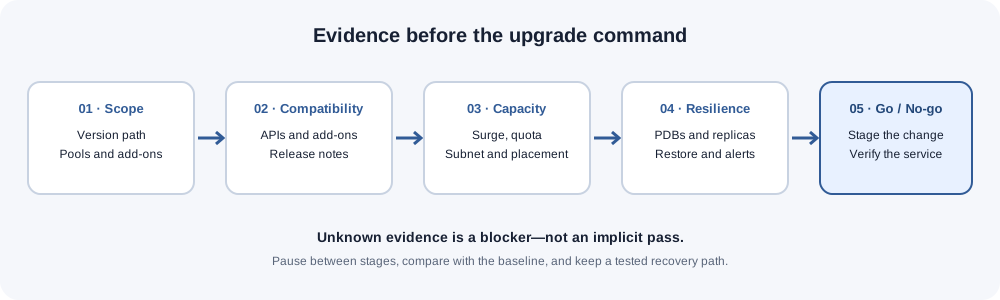
1. Freeze the exact change scope
Record the cluster, current Kubernetes version, target version, node pools, maintenance window, add-ons and any related infrastructure changes. Avoid combining an unrelated application release or network change with the platform upgrade unless the combined risk has been explicitly reviewed.
Start with read-only discovery:
az aks show --resource-group "$RG" --name "$CLUSTER" --query "{version:kubernetesVersion,state:provisioningState}" -o yaml
az aks get-upgrades --resource-group "$RG" --name "$CLUSTER" -o table
az aks nodepool list --resource-group "$RG" --cluster-name "$CLUSTER" -o table
kubectl get nodes -o wide
Evidence to attach: current and target versions, supported upgrade path, node-pool inventory, maintenance window and named change owner.
No-go: the target version is not offered as a supported upgrade, the cluster is already unhealthy, or the scope is still changing.
Review the official AKS upgrade options and the release notes for the exact Kubernetes versions in the proposed path.
2. Check API and add-on compatibility
A control-plane upgrade can expose APIs that were deprecated earlier, as well as compatibility gaps in controllers, admission webhooks, ingress, storage, networking or observability add-ons.
kubectl get apiservices
kubectl get crd
kubectl get deployments -A
kubectl get statefulsets -A
These commands are an inventory, not a complete compatibility test. Compare manifests and installed extension versions with the target-version guidance. Review the Kubernetes API deprecation guide and the AKS release notes. Confirm that critical webhooks respond, certificates are valid, and custom resources have a supported controller.
No-go: an application still depends on an API removed in the target version, or a critical add-on has no validated compatible version.
3. Prove temporary node capacity
Node-pool upgrade settings determine how many replacement nodes may be created during the operation. A surge setting is a capacity requirement, not a guarantee that Azure can provision the nodes.
For percentage-based surge, the node count is rounded up. For example, a three-node pool with a 33% surge needs one additional node; a ten-node pool at the same percentage needs four. The extra nodes still need VM quota, subnet IP capacity, schedulable pod capacity and a viable placement for workloads.
Check the actual pool settings and surrounding limits:
- Regional quota and quota for the selected VM family.
- Free IP addresses in the node subnet and the cluster's network mode.
- Pod density, allocatable CPU/memory and resource requests.
- Node selectors, taints, affinity and topology-spread rules.
- Autoscaler limits and whether scale-out can complete within the change window.
- Zone and storage placement constraints.
Use the System Design Capacity Calculator for application traffic assumptions and the network capacity planning guide when the upgrade changes node or subnet demand. Neither replaces checking the real Azure quota and subnet state.
Evidence to attach: per-pool surge setting, calculated extra nodes, quota and subnet headroom, and confirmation that replacement pods can be scheduled.
No-go: the surge nodes cannot be provisioned or the workload has no place to reschedule.
4. Check pod disruption budgets against the actual drain plan
A PodDisruptionBudget (PDB) limits voluntary evictions through the Kubernetes Eviction API. It does not guarantee availability against every failure, and it does not constrain a Deployment's own rolling update in the same way it constrains node drains.
Inspect the live status rather than relying on the YAML alone:
kubectl get pdb -A
kubectl get pdb -A -o wide
kubectl describe pdb -n "$NAMESPACE" "$PDB_NAME"
kubectl get pods -n "$NAMESPACE" -o wide
For each critical workload, record desired replicas, currently healthy replicas, the PDB's desired healthy count, and disruptionsAllowed. Then map the pods on the node or nodes planned for the drain. A positive budget for one workload does not prove that every eviction on the node will succeed.
Worked example
A service has three desired replicas and a PDB with minAvailable: 2.
| State before drain | Healthy replicas | Simplified allowed evictions |
|---|---|---|
| All replicas healthy | 3 | 1 |
| One replica already unhealthy | 2 | 0 |
| Two replicas unhealthy | 1 | 0 |
If only two replicas are healthy, attempting to evict another matching pod would take the workload below its minimum. The drain can wait or fail until the workload recovers or the plan is changed. A larger surge setting alone does not resolve this if replacements cannot schedule or become healthy.
Use the Kubernetes PDB Eviction Safety Calculator to sanity-check a planned eviction wave when the budget uses an absolute replica count. The calculator is a planning aid: live status.disruptionsAllowed, selectors, unhealthy-pod policy and the actual eviction response remain authoritative. Percentage-based PDBs need their own rounding and controller-status check.
Read the Kubernetes disruption guidance before changing a budget. Do not reduce availability protection simply to make a drain pass without an explicit workload-owner decision.
No-go: a critical workload has zero allowed disruptions for the planned drain, has fewer healthy replicas than its required minimum, or cannot schedule replacement pods.
5. Prove stateful recovery and dependency readiness
Before a node is drained, verify that stateful workloads have a recovery plan that has actually been tested. A successful backup job is not the same as a successful restore.
Confirm:
- The most recent backup is complete and the restore procedure has been exercised.
- Persistent volume claims bind correctly and storage topology supports rescheduling.
- Database, cache and message-broker failover behaviour is understood.
- Replicas and quorum requirements are healthy before the change.
- External services, DNS, certificates, ingress and network policies are reachable from replacement pods.
- The owner of each critical dependency is available during the change window.
For event-driven workloads, check consumer lag and replay behaviour as well as pod readiness. The existing Kafka notification architecture guide discusses the difference between successful message publication and downstream processing.
No-go: recovery evidence is missing, a quorum is already degraded, or a critical dependency has an unresolved compatibility issue.
6. Agree on observable success and a recovery path
Define the signals that decide whether the change is healthy before the upgrade starts. At minimum, capture a baseline for:
- Node readiness and Kubernetes system components.
- Pod readiness, restarts, pending pods and failed scheduling.
- Application error rate, latency and saturation.
- Persistent storage and database health.
- Synthetic business journeys and critical API operations.
- Service-level indicators and remaining error budget.
The SLO error-budget planning guide can help define the reliability signals used by the change owner. The Cloudflare/Nginx origin-security guide is relevant when external routing and origin reachability are part of the application path.
Document who can stop the rollout, how to pause between node pools, and the supported recovery procedure. Do not assume that an in-place downgrade of the AKS control plane is supported. Verify the recovery options for the exact AKS configuration and make sure the backup/restore path is usable.
No-go: no one owns the decision, alerts cannot distinguish a healthy rollout from a degraded service, or the recovery path exists only on paper.
7. Execute in small, verifiable stages
Use the supported AKS upgrade sequence for the selected target version. Keep the change bounded and observe the system between stages:
- Confirm the final preflight record and baseline.
- Upgrade the control plane and node pools in the supported order.
- Where the process allows, complete and validate one node pool before continuing to the next.
- Watch node readiness, PDB status, scheduling, events, application errors and latency.
- Run the agreed synthetic and business-level checks after each meaningful stage.
- Stop when a defined threshold is breached; do not continue merely because the CLI command is still running.
Useful post-stage checks include:
kubectl get nodes -o wide
kubectl get pods -A -o wide
kubectl get pdb -A
kubectl get events -A --sort-by=.lastTimestamp
A green command exit is only one signal. It does not prove that the application is serving correctly or that the next node pool has enough headroom.
Go/no-go record
| Gate | Go evidence | No-go condition |
|---|---|---|
| Version and APIs | Supported path and compatible add-ons | Removed API or unverified critical add-on |
| Capacity | Quota, subnet and scheduling headroom proven | Surge nodes or replacement pods cannot fit |
| Disruption | Healthy replicas and PDB status support the drain | Critical eviction is blocked or workload already degraded |
| State | Restore tested and dependencies healthy | Missing restore evidence or degraded quorum |
| Operations | Baseline, alerts, owner and recovery plan agreed | No clear stop criteria or recovery owner |
| Validation | Post-stage application checks defined | Success is judged only by CLI completion |
Closing
A safe upgrade is not a command checklist alone. It is a decision supported by evidence about compatibility, capacity, voluntary disruption, state recovery and observable application behaviour.
Keep the full AKS production-readiness guide as the architecture reference, and use this checklist with the PDB Eviction Safety Calculator during the change review. If a gate is unknown, record it as unknown and resolve it before approval rather than treating it as a pass.